How to Capture the {FRAMES} of all supported Media files [Movie Media
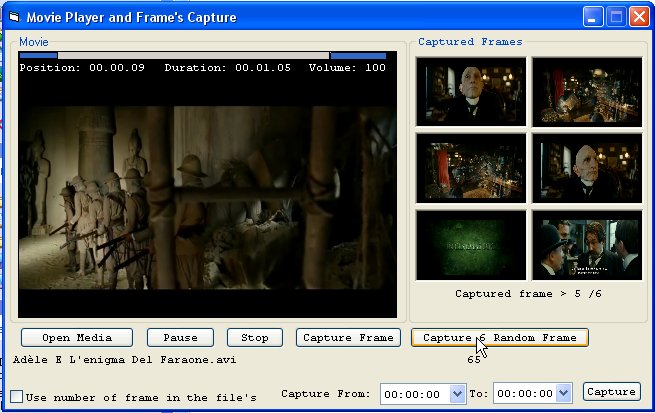
UPDATE ON 02-22-2011 -> How to Capture the {FRAMES} of all supported Media files [Movie Media]...
The Author of the original code of the Media Player OCX is: Jason Lusk (EvilTeddyBear)
Found it at this link: https://www.vbcoders.com/vb/scripts/ShowCode.asp txtCodeId=48129&lngWId=1 ! I used the dll freeware CapStill.dll to capture frames. You found the DLL at this link: https://www.gdcl.co.uk/index.htm. Supported and Captured movie format: *.avi;*.asf;*.mpg;*.mpeg;*.wmv;*.divx;*.dat;*.mpx;*mkv;*.mov;*.vob;*.flv
Don't forget to register the DLL CapStill.dll and adding a reference to this library before running the project! Also adding the reference 'Microsoft Active Movie Control Library'...
NEW UPDATE:
Capture Random 6 Frame's.
Convert captured BMP image to JPG compatible image file.
FEAUTURE's:
Capture from xx:xx:xx time to xx:xx:xx time
Enjoy
 (8(8 Vote))